# BlastWave — A Cross-Platform GPU Engine
*2026-03-25 — Engineering — By Kim*
> Built a cross-platform game engine on SDL3's GPU API with cross-compiled shaders and 20+ post-processing effects. Runs on everything from Mac to Nintendo Switch — me and my son have been playing pong on it.
I'm working on [Lunar Soil](/games/lunarsoil) in Unreal 5 and it's going well, it's a big game and the engine is huge.
Feels like a one-man army triple AAA studio.
And after sitting in this monumental and advanced game engine it's nice to go look at how simple things could be.
So let's keep it simple... But not too simple, how about if we just make a little one... a little game-engine but have some of the modern touches.
I'm just going to sample it a bit... see if it works...
Would be cool to have like Blender support, lighting and [pixelart](/games/bit-animation-editor).
Wait.. is that a [cross platform GPU API?](https://wiki.libsdl.org/SDL3/CategoryGPU)
---
One earth moment later
---
So I made a modern hybrid forward/deferred game engine with cross platform GPU support and cross-compiled shaders and like **20** post-processing art effects and an entire rendering pipeline that works on a lot of different GPUs and hardware.
Mac, Linux, Windows, iOS, Steamdeck and even Nintendo Switch!
[🎬 Video](https://cdn.morgondag.io/gpu_all_the_things.mp4)
## One pipeline to rule them all (kinda)
SDL GPU creates a unified pipeline for all supported GPUs, meaning that we don't really need to write any Metal, OpenGL, Vulkan or DirectX code.
It's a unified platform that picks the supported hardware and abstracts away the differences.
The built-in SDL renderer does the same but it doesn't expose the low-level GPU API, so you're missing out on shaders and other goodies.
For [Bit Animation Editor](/games/bit-animation-editor) I wrote the renderer using SDL's built-in simplified renderer — it's easy, good performance and worked well for the art tool I wanted to make with simple flat pixelart.
It has always felt a bit sad to go to the lower APIs and write render code manually only to end up with OpenGL that doesn't work on Metal, or Vulkan stuff that's not supported on another platform.
But now with SDL GPU we have a unified platform that works across all supported GPUs without any code changes.
Sadly WebGL is not supported. So no WebAssembly as of [yet](https://github.com/libsdl-org/SDL/issues/10768) — with that it would truly be cross platform.
I can imagine at some point when the web specifications land on some form of standard, a web GPU backend will be supported as well.
Can't win them all. All the other platforms in the world though, that's a pretty good deal for a cross platform rendering layer.
[🎬 Video](https://cdn.morgondag.io/render_geometric.mp4)
## Cross-compiled shaders
So there are actually two layers to it. The GPU abstraction layer handles the differences between OpenGL, Vulkan, Metal and DirectX, while the shader compilation layer compiles shaders to the target GPU's native language.
That's where [SDL_shadercross](https://github.com/libsdl-org/SDL_shadercross) comes in.
So we write a shader in for example HLSL and get the shader out in DXIL, MSL, or SPIR-V.
Then we ship the shaders with the program and just load the correct one at runtime for the current GPU.
You can now invest in good shaders across all platforms without needing to write multiple versions.
That's a really good value proposition.
Shaders are a really nice way to express art and visual effects in your own way.
[🎬 Video](https://cdn.morgondag.io/render_particles.mp4)
## All the post-processing you can eat
So once you're in shader-land you can do all kinds of post-processing effects.
Unity and Unreal usually make these effects a big deal, but with a good shader pipeline you can do them yourself.
I've written quite a few — things like chromatic aberration, bloom, god rays, Kuwahara filtering, dithering, scanlines, vignette and tonemapping.
Just have to be a bit careful with performance, but that's a tradeoff worth it for the flexibility.

## Art pipeline
### Bit Animation Editor
The engine has native support for animated sprite compositions made in [Bit Animation Editor](/games/bit-animation-editor). Compose your art in Bit, export it, and it just works in the engine with full animation support.
With some nice upgrades like palette, masking,shading and playback control support.
[🎬 Video](https://cdn.morgondag.io/bit_support.mp4)
### Blender Grease Pencil
Grease Pencil drawings from Blender can be imported and rendered natively in the engine. No conversion step, no janky workarounds — just export from Blender and load it up.
It was quite messy to read Blender files but I think this is a really cool addition, now we got 3D line art supported natively.
And we have wiggly lines and we can hook up the 3D spatial rendering to user interactions and at the same time play the Blender timeline animations.
This is like a homage to Flash. We also made a little key event to allow randomized looping of sequences so in Blender you can control when a frame loops to where and at what randomization chances.
I looked into what tool to support for this, Lottie animations sounded great but that mostly requires After Effects. And I really don't want to build on top of any Adobe products..
Blender is great!
[🎬 Video](https://cdn.morgondag.io/blender_support.mp4)
## Game Loop & Scenes
On top of the rendering pipeline, state and game system, a simple API is exposed for scenes.
Each scene gets its own ECS registry, so you can set up entities completely differently for every type of game.
Some games don't even need much — pong would just need a couple of paddles and a ball.
The scene API is a fairly high level set of classical game loop functions:
```c
virtual void onEnter();
virtual void onPlay();
virtual void onPause();
virtual void onResume();
virtual void input(SDL_Event *event);
virtual void update();
virtual void lateUpdate();
virtual void fixedUpdate();
virtual void preRender(SDL_GPUCommandBuffer *cmd);
virtual void renderBackground(RenderContext *rc);
virtual void render(RenderContext *rc);
virtual void renderLight(RenderContext *rc);
virtual void renderUI(RenderContext *rc);
virtual void onExit();
```
- **onEnter** — Initialize resources, load textures and blends, set up your entities.
- **onPlay** — Called after the enter transition completes. Good for triggering intro animations or music.
- **onPause / onResume** — Called when an overlay is pushed on top or when it closes. Scenes can be stacked.
- **input** — Per-scene SDL event handling. Keyboard, mouse, gamepad, touch — it all comes through here. Mostly we hook this into the player controller though.
- **update** — Called every frame. Main game logic lives here. This is also where you add shapes to the shared batches.
- **lateUpdate** — Called after update. Camera follow, UI sync, anything that depends on the frame's state being resolved.
- **fixedUpdate** — Fixed timestep. Physics, timers, anything that needs deterministic timing.
- **preRender** — Escape hatch for custom GPU uploads. Rarely needed but there when you need it.
- **renderBackground** — World pass with depth off. Starfields, parallax layers, background fills.
- **render** — Main world pass. Per-draw rendering for meshes, lines, special sprites.
- **renderLight** — Deferred lighting pass. Emit point lights, ambient light, shadows into the light buffer.
- **renderUI** — Final pass. HUD text, menus, special widgets on top of the game world.
- **onExit** — Cleanup resources, save state, release what you loaded.
The nice thing is that you don't have to manage draw batches yourself. The system handles six shared batches — geometry, sprites, and flat shapes for both the world pass and the UI pass. You just add shapes in `update()` and the system takes care of begin, flush, upload, and draw.
The world pass draws in order: flat batch (grid tiles, particles, Grease Pencil strokes) → sprite batch → geometry batch (SDF shapes, overlays) → then your scene's `render()` for anything custom. The UI pass follows the same pattern with its own set of batches before calling `renderUI()`.
## Hyper casual gaming — AKA Pong
With the scene system in place even the simplest games become trivial to set up. You should keep it simple — start your engine-career out with some basic games like pong.
Here's Pong running in the engine with the full rendering pipeline, post-processing and all — just because we can.
[🎬 Video](https://cdn.morgondag.io/gpu_pong-clip.mp4)
Me and my son have actually been playing this on the Nintendo Switch and the iPad, taking turns trying to beat the AI. The fact that the same game just runs on all devices with the same rendering pipeline and no platform-specific code — that's the whole point of this engine really.
Things got a bit out of hand when we added camera support for rotating the game screen, but that's another story.
[🎬 Video](https://cdn.morgondag.io/rotate_pong.mp4)
## AI-Driven Game Development with MCP
We created a WebSocket server and MCP bridge that lets AI agents control the engine in real-time. Every system is network-addressable — switch scenes, tweak post-processing, move the player, spawn lights, capture screenshots — all through the same JSON protocol that local input uses. A keyboard press and a network command are indistinguishable; both flow through the EventBus as identical events.
This enables fully hands-off debugging: an AI agent can navigate to a scene, screenshot the result, read frame timings, adjust effects, and verify changes. You can also batch a series of commands together over time to automate repetitive tasks or test sequences.
This also accidentally works for iPhones, so you can remotely control the phone from a laptop or desktop via a WebSocket connection or MCP agent.
I can imagine an agentic AI first editor for authoring content but also for realtime communication at runtime.
Maybe the new wave of auto-battlers are played by AI (that's a segue into dead internet theory).
## Performance across platforms
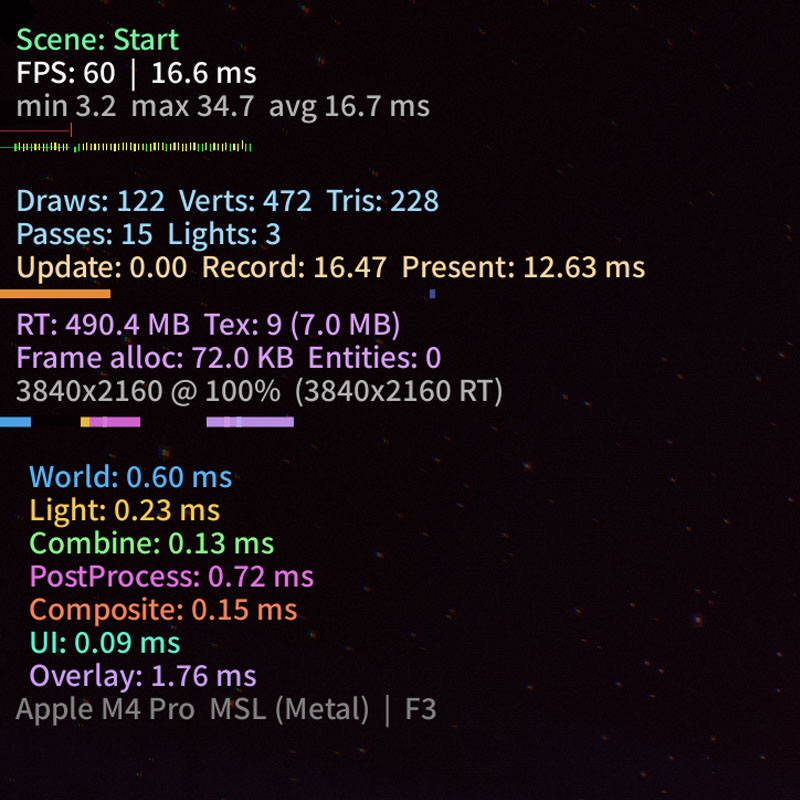
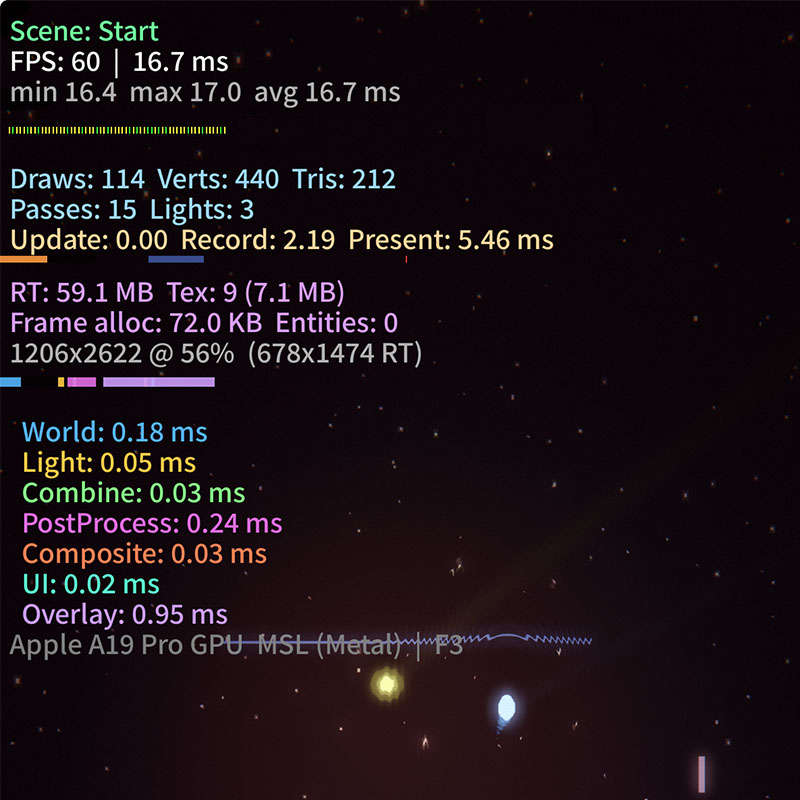
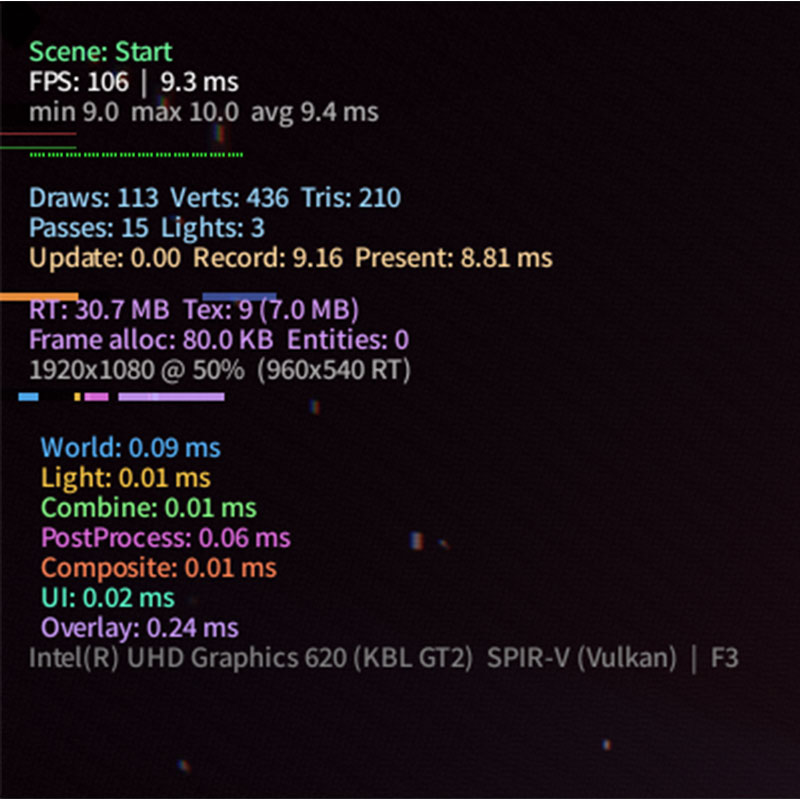
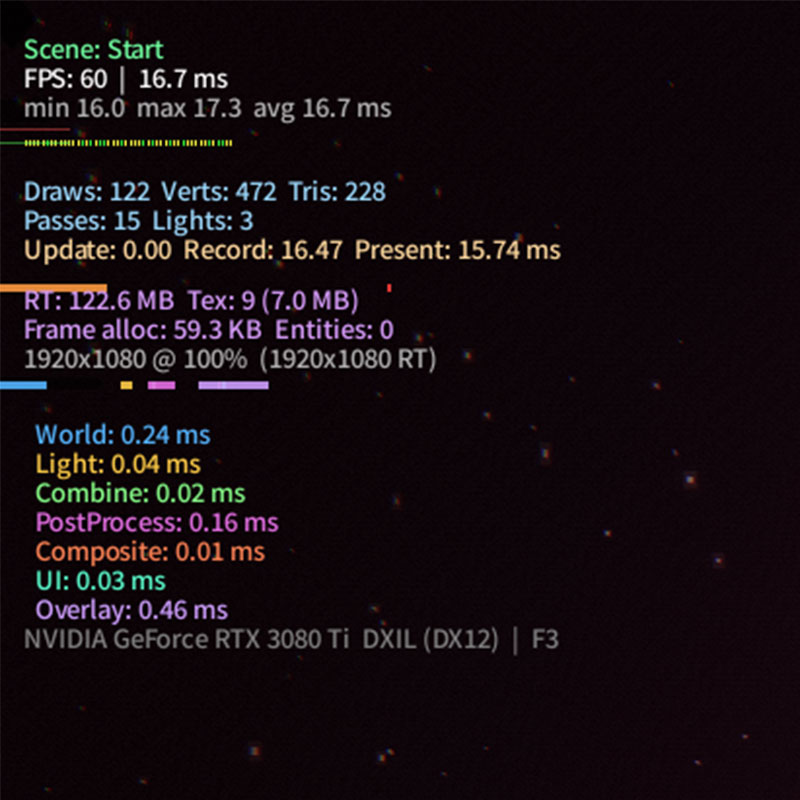
The rendering pipeline adapts to whatever GPU is available — Metal on Apple devices, Vulkan on Linux and Steamdeck, DirectX 12 on Windows.
Consistent high frame rates across all of them, even with the full post-processing stack enabled.
[🎬 Video](https://cdn.morgondag.io/rendering_more.mp4)
[🎬 Video](https://cdn.morgondag.io/rendering_space.mp4)
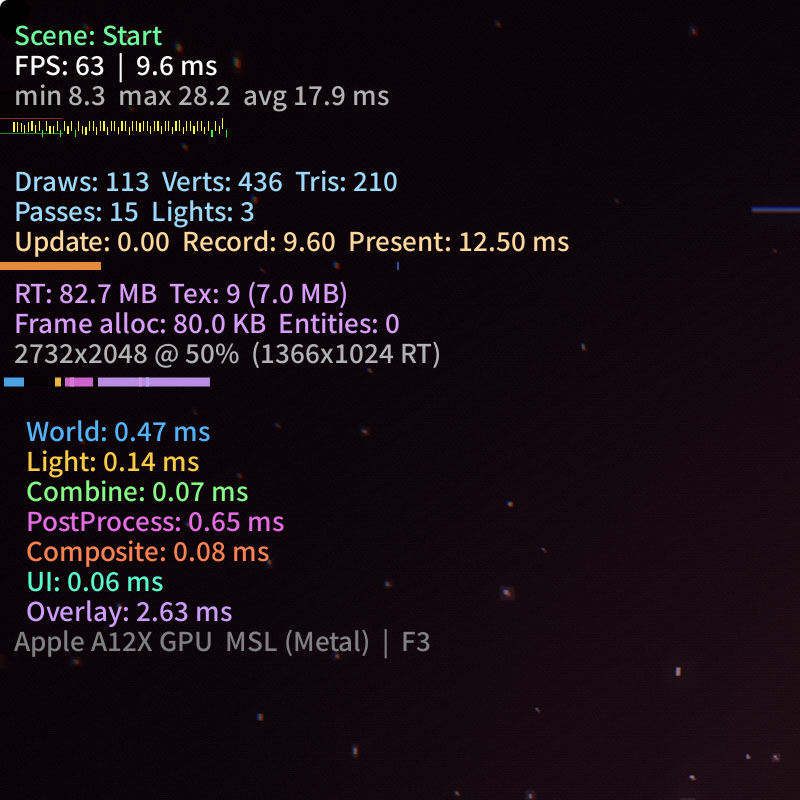
FPS counters from the different platforms:
## Nintendo Switch
Getting this to run on the Nintendo Switch with almost zero rendering changes.

Almost zero — all of these post-processing effects can be quite taxing so we optimize their scale and resolution, and turn some of the expensive ones off.
The biggest difference from for example desktop Retina Mac Mini 4K rendering to the Switch is just the rendering scale.
On a modern Mac Mini we can afford to render at a higher resolution, but the Switch has less processing power so we render at a lower resolution scale.
Same concept goes for mobile devices with lower pixel densities.
## All of the nice things
The engine comes with a lot of things that I like having when making games or art.
- Save system backed with SQL
- Localization setup
- SFX and music management
- Entity component system to hook into the scenes
- MCP and WebSocket control for batched AI and remote controlling the game
- Network intent system for controlling the game remotely
- Player controller for unified input across devices
- Menu intent system for controlling UI states
- Particle engines
- Camera system
- Mesh rendering
- Tweening
- DPI scaling
- Damage numbers
- Transition system
## Then what?
So what am I building with the engine?
I'm absolutely making a game with this
— but that has to wait until [Lunar Soil](/games/lunarsoil) is finished!
[🎬 Video](https://cdn.morgondag.io/rendering_isometric_gameplay.mp4)
I'm calling this engine **BlastWave**.
## Questions & Answers
*Questions about the article, answered by the developer.*
**1. You're deep in Unreal 5 building Lunar Soil — why on earth would you start a second engine from scratch instead of just... taking a break?**
I think that was the break! Relaxing low-level programming then going back to a high-level engine again.
**2. WebGL being missing from SDL GPU feels like a pretty big hole — did you ever consider just building on WebGPU directly and skipping SDL's abstraction altogether?**
Well there are other ways to do it as well, but I think it will be made available, and my primary target is not web-games so I think its fine.
**3. The MCP bridge where AI agents can remotely control the engine — has an AI actually found a bug or done something useful with that, or is it still more of a cool demo?**
Yes it help be debug and check performance and we can automate a lot of things even gameplay and writting test instructions that are usually fairly complex and require a E2E framework to perform without.
**4. You chose to read raw Blender files for Grease Pencil support instead of using an interchange format like Lottie — how bad was parsing those files, and do you regret it?**
Well the good news is that Blender is open source! So you can actually go and have a look. the parsing was mainly hard becouse thare are so many versions of the meta-data and how they structure it.
But once you have that data is good!
**5. What actually had to get turned off on the Switch to make it run, and did losing those effects change how the game felt?**
SSAO was fairly expensive to calculate so I turned that off, and lowered rendering scale just like any handheld device. These are just post-processing effects, sure they can be used for art direction but if your building your entire artstyle on one post-processing effect you better make that performant (or better yet not do it).
**6. You've got this engine running on six platforms with a full rendering pipeline — isn't the real danger that BlastWave becomes the project and Lunar Soil never ships?**
All sidequest are dangerously delicous distractions to any long running project.
But no, Lunar Soil gets finished first before I make a game with this engine.
---
*Canonical URL: https://morgondag.io/news/blastwave-cross-platform-gpu-engine*